
Quick answer
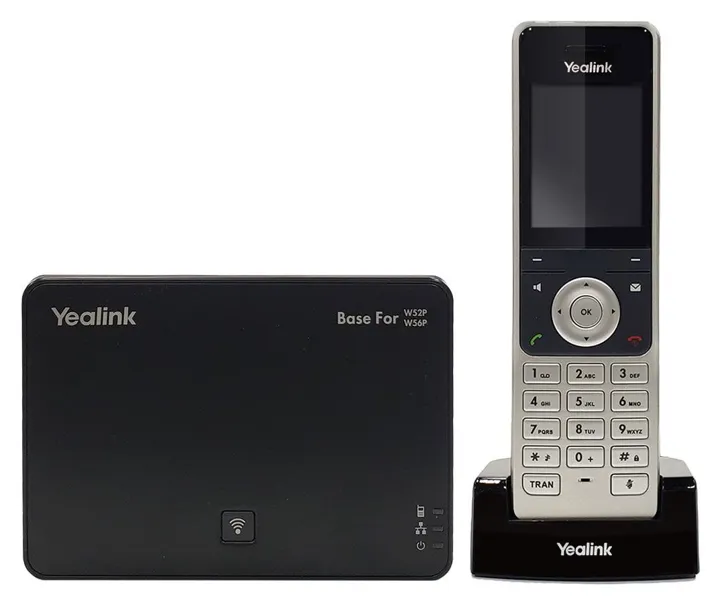
Yealink W56P and AX83H handsets connect by DECT radio to a base station, the AX86R is a desk phone that can pair with DECT handsets, and Grandstream WP820/WP822 handsets use Wi-Fi. On ConnectUC they all use 5001 for voicemail and *50 for intercom.
Models covered
How each model connects
| Model | Type | Connects through |
|---|---|---|
| Yealink W56P | DECT cordless | W56/W60-series base station on your network |
| Yealink AX83H | DECT cordless handset | A compatible Yealink DECT base station |
| Yealink AX86R | Desk phone with DECT | Network cable; can pair with DECT handsets |
| Grandstream WP820 | Wi-Fi handset | Your office Wi-Fi network |
| Grandstream WP822 | Rugged Wi-Fi handset | Your office Wi-Fi network |
Everyday calling
Handsets put most features on the soft keys and the OK/menu button. The ConnectUC platform codes are the same as on desk phones.
| Task | What to do | What happens |
|---|---|---|
| Answer a call | Lift the handset or press the Speaker button. | Answers the incoming call. |
| Make a call | Dial the number or extension, then lift the handset or press Speaker. Or lift the handset, dial, and press Send. | The phone places your call. |
| Do Not Disturb | Press the DND soft key. | Calls go to voicemail instead of ringing your phone. |
| Check voicemail | Press the Message (envelope) button, or dial 5001. Enter your PIN when prompted. | Opens your voicemail box. |
| Redial | Press the Call or Redial key from the idle screen and choose the number. | Calls a number you dialed before. |
| Attended transfer | Press Transfer, dial the extension, then press #. Speak with the recipient; once they accept, press Transfer again. | You speak privately with the recipient before transferring the caller. |
| Blind transfer | Press Transfer, dial the extension, press Transfer again, then hang up. | Transfers the caller without speaking to the recipient first. |
| Transfer to voicemail | Press Transfer, dial 7 followed by the extension, then press Transfer again. | Sends the caller straight to the recipient's voicemail without ringing their phone. |
| Intercom | Dial *50 followed by the extension. | Opens an intercom channel to the other phone. |
| Conference call | During a call, press CONF, dial the next participant, then press CONF again. | Adds another participant to your call. |
Call park keys are a desk phone feature. On handsets, ask support about adding a park speed dial if you need it.
Battery and range tips
- Charge handsets overnight; replace batteries when talk time drops noticeably.
- Place DECT bases high and away from metal cabinets and microwaves.
- Large buildings may need DECT repeaters or a multi-cell system. HopDial can recommend one.
- Wi-Fi handsets need strong Wi-Fi everywhere they are used; weak coverage causes choppy audio.
Quick troubleshooting
| Symptom | Try this |
|---|---|
| Blank screen or no power | Check that the network cable is firmly seated. If the phone is powered over Ethernet (PoE), try a different switch port, or use the power adapter if you have one. |
| Screen says No Service or Network Unavailable, or shows no line | Unplug the power (or the PoE network cable) for 10 seconds and plug it back in. If several phones show this at once, restart your internet modem or router, then contact support. |
| Choppy, robotic or one-way audio | Usually a network issue. See the network and firewall guide (QoS, SIP ALG) and open a ticket with the time of the call and the number dialed. |
| A programmed key or name label is wrong | Keys are set from HopDial's side. Open a ticket with your extension and the change you need. |
Please don't factory reset a phone unless HopDial support asks you to. A reset can erase the settings that connect it to your phone system.
Frequently asked questions
How do I check voicemail on a cordless handset with ConnectUC?
Press the message key or dial 5001, then enter your PIN.
My WP820 drops calls in some rooms. Why?
Wi-Fi handsets depend on Wi-Fi coverage. Dead spots or congested access points cause drops; open a ticket and we can review your network.
Still stuck?
Open a ticket with your extension and phone model, or call 866.305.0407.
Open a support ticket