
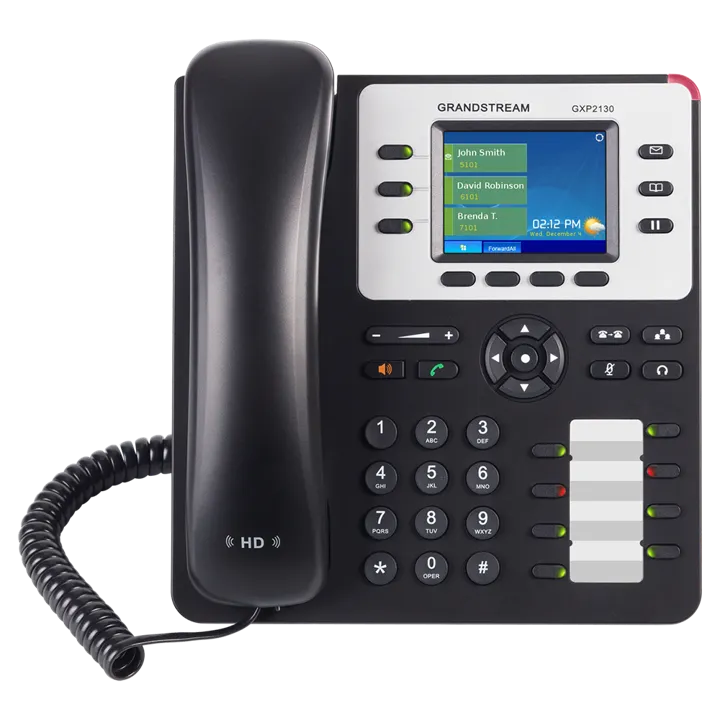
Quick answer
On CoreNexa, the Grandstream GXP2130 and GXP2160 use the Mute key for Do Not Disturb, *90 plus the extension for intercom, and Line 2 for attended transfers. Call forwarding is set from the phone menu under Phone > Call Features.
Models covered
Everyday calling
| Task | What to do | What happens |
|---|---|---|
| Answer a call | Lift the handset or press the Speaker button. | Answers the call. |
| Make a call | Dial the number or extension, then press Speaker or lift the handset. | Places the call immediately. |
| Do Not Disturb | Press the Mute button while the phone is idle. | Calls go to voicemail. |
| Check voicemail | Press the envelope button, or dial * followed by your extension. | Asks for your password. |
| Redial | Press the Redial soft key. | Calls the last number dialed. |
| Park a call | Press your assigned green park BLF key. | The caller waits in that park spot. |
| Pick up a parked call | Press the park BLF key that is lit red. | Connects you to the parked call. |
| Attended transfer | Press Line 2, dial the extension and press Dial. After they accept, press Line 1 and complete the transfer with the Transfer key. | You talk to the recipient first. |
| Blind transfer | Press Transfer, dial the extension, press Transfer. | Sends the caller straight to the extension. |
| Transfer to voicemail | Press Transfer, dial the extension, press *, then press Transfer. | The caller goes straight to voicemail. |
| Intercom | Dial *90 followed by the extension. | Opens an intercom channel. |
| Conference | Press the Conference key, dial the number, press Dial, then press the ConfCall soft key. | Joins both parties into one call. |
Forward calls from a GXP2130
- Press the round Menu button.
- Select Phone, then Call Features.
- Select the first account listed. You will see Forward All, Forward Busy and Forward No Answer.
- Arrow to the option you want (for example Forward All).
- Enter the number with the area code and no 1 in front, for example 2155551212.
- Press Save, then back out to the home screen.
To stop forwarding, return to the same screen, clear the number, and press Save.
Import a phone book
The GXP2130 can import contacts from an XML phone book file. Create the file with Grandstream's free Universal Phonebook Editor (it can import a contact list and export it as XML).
- Find the phone IP address on the phone screen (or under Menu > Status).
- Type that IP address into a web browser on the same network and sign in to the phone's web page. If you do not know the login, ask support.
- Go to Phone Book > Phone Book Management.
- Use the upload button to send your XML file to the phone.
Print button labels
The GXP2130 and GXP2160 have paper labels next to the programmable keys. HopDial support can send a Word template sized for these phones so you can type and print clean labels instead of writing them by hand.
Quick troubleshooting
| Symptom | Try this |
|---|---|
| Blank screen or no power | Check that the network cable is firmly seated. If the phone is powered over Ethernet (PoE), try a different switch port, or use the power adapter if you have one. |
| Screen says No Service or Network Unavailable, or shows no line | Unplug the power (or the PoE network cable) for 10 seconds and plug it back in. If several phones show this at once, restart your internet modem or router, then contact support. |
| Choppy, robotic or one-way audio | Usually a network issue. See the network and firewall guide (QoS, SIP ALG) and open a ticket with the time of the call and the number dialed. |
| A programmed key or name label is wrong | Keys are set from HopDial's side. Open a ticket with your extension and the change you need. |
Please don't factory reset a phone unless HopDial support asks you to. A reset can erase the settings that connect it to your phone system.
Frequently asked questions
How do I turn on Do Not Disturb on a Grandstream GXP2130?
On HopDial CoreNexa the Mute button acts as Do Not Disturb while the phone is idle. Press it again to turn DND off.
What format should a forwarding number be in?
Enter the full 10-digit number with the area code and no leading 1, for example 2155551212.
What is the intercom code on a GXP2130?
Dial *90 followed by the extension.
Still stuck?
Open a ticket with your extension and phone model, or call 866.305.0407.
Open a support ticket