
Quick answer
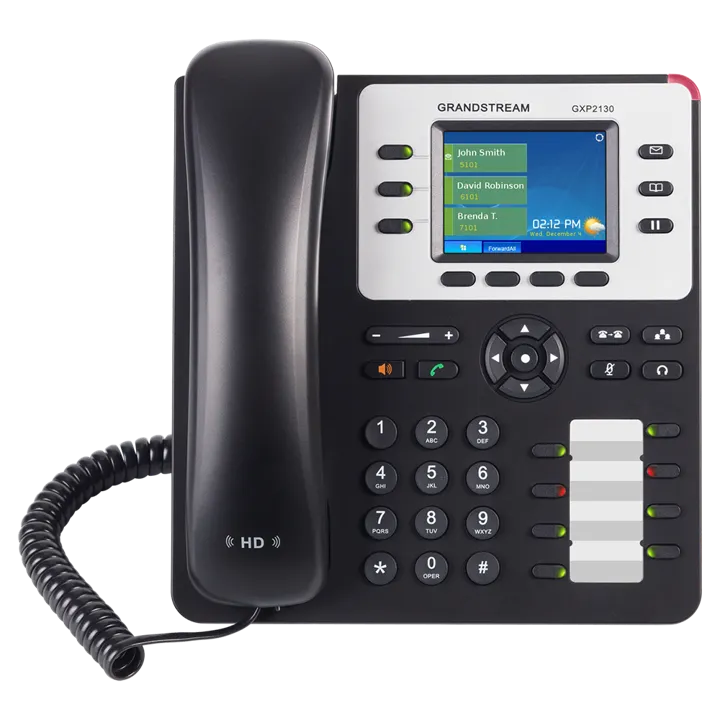
The Grandstream GXP2100 is an older phone that uses the standard CoreNexa codes for voicemail and transfers. If it stops working, contact HopDial support to re-provision it rather than changing settings yourself; it should be replaced when possible.
Models covered
Everyday calling
| Task | What to do | What happens |
|---|---|---|
| Answer a call | Lift the handset or press the Speaker button. | Answers the call ringing your phone. |
| Make a call | Dial the number or extension, then press Speaker or lift the handset. Or lift the handset, dial, and press Send. | Dialing first and then going off-hook places the call immediately. |
| Do Not Disturb | Press the DND soft key. | Your phone stops ringing and calls go to voicemail. |
| Check voicemail | Press the Message button, or dial * followed by your extension. | Connects to your mailbox and asks for your password. |
| Redial | Press the Redial key. | Calls the last number you dialed. |
| Park a call | During the call, press your assigned (green) park BLF key. | The caller waits in that park spot. |
| Pick up a parked call | Press the assigned park BLF key that is lit red. | Connects you to the parked caller. |
| Attended transfer | Press Transfer, dial the extension, press Send. Talk to the person, then press Transfer once they accept. | You speak privately with the recipient before handing over the caller. |
| Blind transfer | Press Transfer, dial the extension, press Transfer, then hang up. | Sends the caller straight to the extension. |
| Transfer to voicemail | Press Transfer, dial the extension, press *, then press Transfer. | The caller goes straight to that person's voicemail without ringing their phone. |
| Intercom | Use the code your administrator provided. | Opens a one-touch talk path to the other phone. |
| Conference | During a call, press CONF, dial the next number, then press CONF again. | Adds another party to your call. |
Factory reset and re-provisioning
Only when HopDial support asks: the GXP2100 factory reset is under MENU > Config > Factory Reset > OK. Afterwards, support will give you the provisioning details and the phone takes about 3 to 4 minutes to reload its settings.
Do not reset the phone on your own. Without the provisioning details, the phone will not reconnect to your service.
Why this is in Legacy
The GXP2100 has been discontinued for many years. Its successor, the GXP2130, works the same way on CoreNexa.
Frequently asked questions
Should I factory reset my GXP2100?
Only if HopDial support asks you to. Support needs to give you the provisioning details so the phone can reconnect.
Still stuck?
Open a ticket with your extension and phone model, or call 866.305.0407.
Open a support ticket