
Quick answer
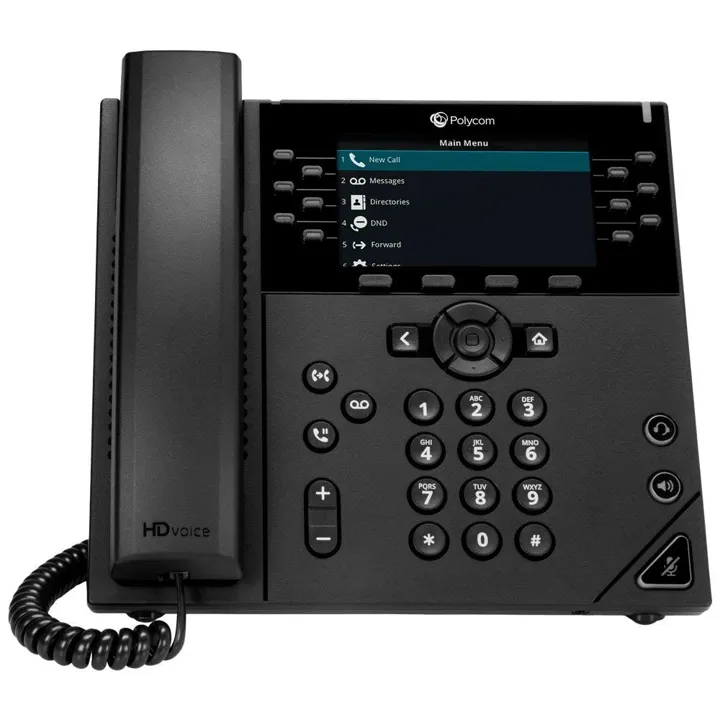
The Polycom VVX 500 is a touchscreen desk phone. On CoreNexa, use the Transfer soft key for transfers, add * before completing a transfer to send a caller to voicemail, and dial * plus your extension for voicemail.
Models covered
Everyday calling
The VVX 500 shows its functions as touch soft keys on the screen. The platform codes are the same as other CoreNexa phones.
| Task | What to do | What happens |
|---|---|---|
| Answer a call | Lift the handset, press Speaker, or tap Answer. | Answers the call. |
| Make a call | Dial the number and tap Dial, or lift the handset and dial. | Places the call. |
| Do Not Disturb | Tap DND on the home screen (or the DND key if programmed). | Calls go to voicemail. |
| Check voicemail | Press the Messages key, or dial * followed by your extension. | Asks for your password. |
| Park / pick up | Use your assigned park line keys (green to park, red shows a parked call to pick up). | Parks or retrieves the call. |
| Attended transfer | Tap Transfer, dial the extension, talk to them, then tap Transfer again. | You speak to the recipient first. |
| Blind transfer | Tap Transfer, then Blind (if shown), dial the extension. | Sends the caller straight through. |
| Transfer to voicemail | Tap Transfer, dial the extension, press *, then tap Transfer. | The caller goes straight to voicemail. |
| Conference | During a call tap Conference, dial the next number, then tap Conference again. | Joins all parties. |
Soft key labels can differ slightly between Polycom firmware versions. If a key is missing, tap More to see additional options.
Planning a replacement
Polycom (now HP Poly) has ended sales of the VVX 500. It keeps working on CoreNexa, but if you are adding users or replacing a damaged phone, HopDial can recommend a current Yealink model.
Quick troubleshooting
| Symptom | Try this |
|---|---|
| Blank screen or no power | Check that the network cable is firmly seated. If the phone is powered over Ethernet (PoE), try a different switch port, or use the power adapter if you have one. |
| Screen says No Service or Network Unavailable, or shows no line | Unplug the power (or the PoE network cable) for 10 seconds and plug it back in. If several phones show this at once, restart your internet modem or router, then contact support. |
| Choppy, robotic or one-way audio | Usually a network issue. See the network and firewall guide (QoS, SIP ALG) and open a ticket with the time of the call and the number dialed. |
| A programmed key or name label is wrong | Keys are set from HopDial's side. Open a ticket with your extension and the change you need. |
Please don't factory reset a phone unless HopDial support asks you to. A reset can erase the settings that connect it to your phone system.
Frequently asked questions
How do I send a caller to voicemail from a Polycom VVX 500?
Tap Transfer, dial the extension, press *, then tap Transfer to complete it.
Is the VVX 500 still supported?
It still works on HopDial CoreNexa, but the manufacturer has stopped selling it, so plan replacements with a current model.
Still stuck?
Open a ticket with your extension and phone model, or call 866.305.0407.
Open a support ticket